Workout tracker for iPhone + Apple Watch

Log every set in seconds.

Last time's weight and reps are already filled in. Tap to finish a set, rest on your wrist, and watch your progress add up.

Download on the App Store

Free to download.
Gymmy Pro is optional.

QR code linking to Gymmy on the App Store

On your computer?Scan with your iPhone camera
to open the App Store.

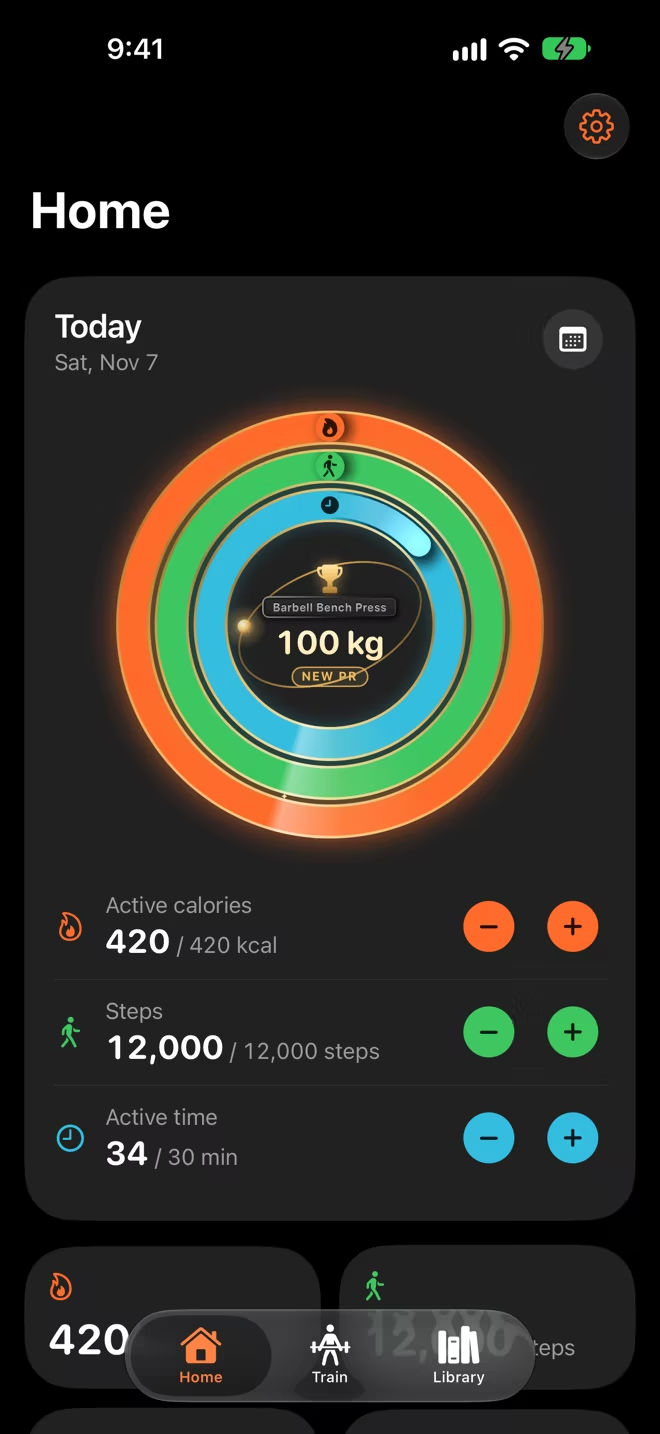
Gymmy Home screen: today's three rings for active calories, steps and active time all closed, with a new 100 kg bench press record in the centre.
Gymmy on Apple Watch: Barbell Bench Press, set 3 of 3, 70 kg for 8 reps, with a Done button.
  • Free to download
  • Works with Apple Watch
  • Works with Apple Health
  • Your data stays in your own iCloud
  • No name or email shared

Built for the gym floor

Spend your time training, not typing.

Free

Last time is already filled in.

Weight and reps come pre-filled from your last session, with what you did last time right beside them. Finish a set with one tap, without entering anything.

  • Warm-ups, drop sets and failure sets
  • Notes per exercise, cardio with speed and incline
  • Reorder what's left, mid-workout
Active workout in Gymmy: Barbell Bench Press with a Last time column, two sets of 72.5 kg ticked off, and the rest timer at 1:23 at the bottom.
Free on iPhone and Apple Watch

Rest on time. Log from your wrist.

A rest timer that stays accurate in the background, with notifications, Lock Screen and Dynamic Island Live Activity. Log sets, add 15 seconds or skip rest from Apple Watch.

  • Next set shown while you rest
  • Start a routine from your Watch

With Gymmy Pro, your Watch also records the workout with heart rate and calories and files it under the right workout type in Apple Fitness and Health.

Gymmy rest timer on Apple Watch at 1:09, next set 3 of 3 at 70 kg for 8, with +15 and Skip buttons.
Current set on Apple Watch: 70 kg, 8 reps and a green Done button.
Gymmy Pro

Your day, in three rings.

Active calories, steps and active time, from the same Apple Health data as the Fitness app and your Apple Watch. Set your own daily goals. A new personal record gets its own celebration in the centre.

  • Day tiles for calories, steps, distance and active time
  • Health data stays on your iPhone
Gymmy Home scrolled down: daily goal rows, tiles showing 420 kcal, 12,000 steps, 9.12 km and 34 minutes, and a shelf of recent awards.
Gymmy Pro

Earn medals you can spin.

Awards for workouts, strength, steps and more, as real 3D medals. Drag one to turn it over and read the engraving on the back.

A gold 3D medal for a 20,000-step day, earned October 27, 2026, with a Share button.
Awards grid with bronze, silver and gold medals for step days, distance, and calories and active time.
Free

114 exercises, shown start to finish.

Every exercise has start and finish pictures, step-by-step setup, common mistakes and safety cautions. Front, back and side views show the main muscle it works.

Barbell Bench Press page with start and finish pictures, a description and numbered execution steps.
Muscles worked: front, back and side body figures with the chest highlighted as the main target muscle.
Free

Every workout, on one calendar.

History shows every training day at a glance, with your personal records and estimated one-rep max. With Gymmy Pro, each day also shows its rings, and trend charts show what's moving.

History calendar for October and November with small daily rings on each day and record marks.

How it works

Three steps to your first set.

  1. 1

    Sign in with Apple

    Gymmy gets an anonymous ID from Apple. No name, no email, no password to remember.

  2. 2

    Pick a routine

    Start one of the example routines, build your own, or begin an empty workout.

  3. 3

    Tap, rest, repeat

    Finish each set with a tap. Rest runs on your iPhone and Watch, and your history fills itself.

Free and Pro

Free to start. Pro when you want more.

Logging, rest timer, history and the exercise library are always free. Your data is never locked.

Gymmy Pro billing

Gymmy

Everything you need to log your training.

$0foreverSupported by ads.
Start free

Always free

  • One-tap logging with last time's numbers
  • Rest timer, Live Activity and widgets
  • Log sets and rest from Apple Watch
  • 114-exercise library with pictures and muscles
  • History, personal records and estimated 1RM
  • iCloud sync and backups
  • Up to 3 routines and 3 custom exercises

Gymmy Pro Best value

No ads, plus rings, medals and Watch tracking.

$24.99/ year7-day free trial for new subscribers. About $2.08 a month.
$3.99/ monthBilled monthly. Cancel anytime.
$79.99onceOne-time purchase. No subscription.
Start free

Everything in Gymmy, plus

  • No ads
  • Daily rings and day tiles
  • Awards and 3D medals
  • Unlimited routines and custom exercises
  • Apple Watch workout tracking
  • Calories from Apple Health
  • Muscle coverage figure
  • Exercise trend charts

US prices; the App Store shows the price for your country. Gymmy Pro is bought in the app. Subscriptions renew automatically unless cancelled at least 24 hours before the end of the current period; payment is charged to your Apple Account and you can manage or cancel in your Apple Account settings. Any unused portion of a free trial is forfeited when you purchase a subscription. Refunds are handled by Apple. Terms of Use ยท Privacy Policy

FAQ

Straight answers.

Is Gymmy really free?

Yes. Gymmy is free to download and supported by ads. Logging, the rest timer, history, the exercise library, records, Live Activity, widgets, iCloud sync and backups are always free. Free includes up to 3 routines and 3 custom exercises.

How much is Gymmy Pro?

$3.99 per month, $24.99 per year with a 7-day free trial for new subscribers, or $79.99 once for lifetime access. These are US prices; the App Store shows the price for your country.

Do I need an Apple Watch?

No. Gymmy works fully on iPhone. With an Apple Watch you can log sets and run your rest timer from your wrist. Recording the workout on the Watch with heart rate and calories is part of Gymmy Pro.

Is there an Android or web version?

No. Gymmy is made for iPhone (iOS 18 or later) and Apple Watch (watchOS 11 or later).

Where is my data stored? Can you see it?

Your workouts, routines and settings are stored on your iPhone (with a working copy on your Apple Watch) and in your own private iCloud. Gymmy has no server or account database of its own, and we (the developer) cannot read your training data.

You sign in with Apple, and Gymmy receives only an anonymous identifier: no name, no email address. Details are in the privacy policy.

Will my workouts move to a new iPhone?

Yes, through your private iCloud. Sign in with the same Apple Account, make sure iCloud is on for Gymmy, then open Gymmy and tap Settings → Account → Sync now. You can also export a backup at any time.

What does Gymmy do with Apple Health?

Health access is optional. With your permission Gymmy can save your finished workouts to Apple Health so they count in the Fitness app, and, with Gymmy Pro, read your daily steps, distance, active energy and exercise minutes for the rings. Health data is used only on your iPhone: never stored in iCloud, never sent to us or to advertisers.

Does the free version show ads?

Yes, from Google AdMob. Ads are personalised only if you allow it, and your Health and workout data are never shared with advertisers. Gymmy Pro removes all ads. This website itself has no ads, analytics or cookies.

How do I cancel Gymmy Pro?

On your iPhone open Settings → your name → Subscriptions → Gymmy Pro, or in Gymmy go to Settings → Gymmy Pro → Manage subscription. Cancel at least 24 hours before the period ends to avoid the next charge. Purchases and refunds are handled by Apple. Your workouts stay yours either way.

How do I get help?

In Gymmy, open Settings → Support, describe the problem and leave a way to reach you. More answers are on the support page.

Your next set is waiting.

Download Gymmy free and log your first workout today, on iPhone and Apple Watch.

QR code linking to Gymmy on the App Store

On your computer?Scan with your iPhone camera.